> ## Documentation Index
> Fetch the complete documentation index at: https://docs.ambient.commure.com/llms.txt
> Use this file to discover all available pages before exploring further.
# Visits
> View and track EMR-synced patient visits in one place.
## Visits
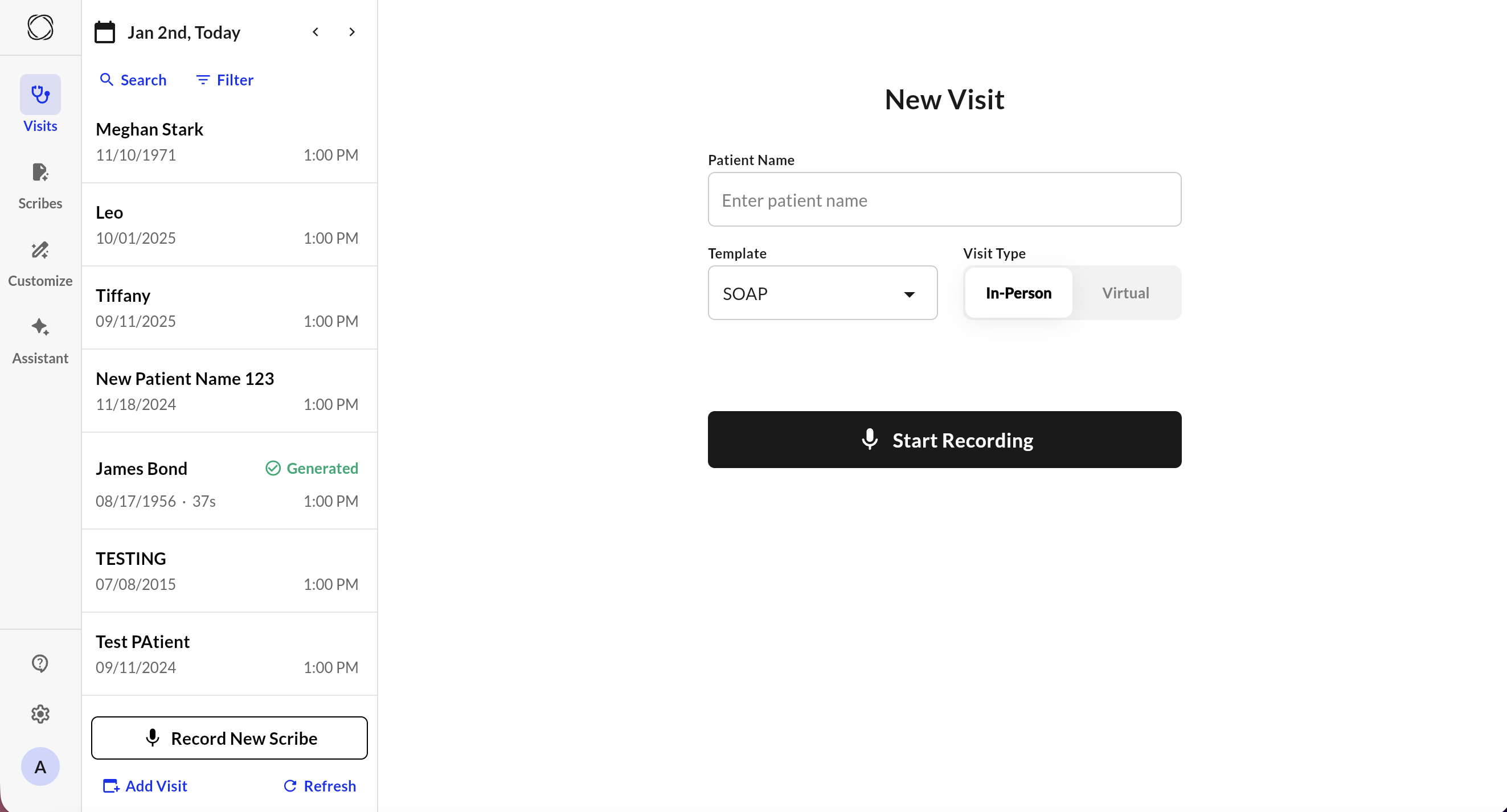
The **Visits** tab allows integrated users to view, manage, and record scribe notes based on patient appointments pulled directly from their EMR. You can also manually create visits if needed.
 ***
### EMR-Integrated Visit Workflow
If your site is integrated with an EMR, appointments will automatically appear in the **Visits** tab for the current day.
Each appointment displays:
* Patient name
* Date of birth
* Appointment time
* Scribe status (e.g., Generated, Incomplete)
To start documenting:
1. Select the patient from the list.
2. Tap **Record New Scribe** at the bottom of the screen.
3. Choose your template, confirm visit type (In-Person or Virtual), and verify that you have patient consent.
4. Tap **Start Recording** to begin the visit.
> Integration ensures all visit data is synchronized with your EHR system in real time.
***
### Manually Adding a Visit
***
### EMR-Integrated Visit Workflow
If your site is integrated with an EMR, appointments will automatically appear in the **Visits** tab for the current day.
Each appointment displays:
* Patient name
* Date of birth
* Appointment time
* Scribe status (e.g., Generated, Incomplete)
To start documenting:
1. Select the patient from the list.
2. Tap **Record New Scribe** at the bottom of the screen.
3. Choose your template, confirm visit type (In-Person or Virtual), and verify that you have patient consent.
4. Tap **Start Recording** to begin the visit.
> Integration ensures all visit data is synchronized with your EHR system in real time.
***
### Manually Adding a Visit
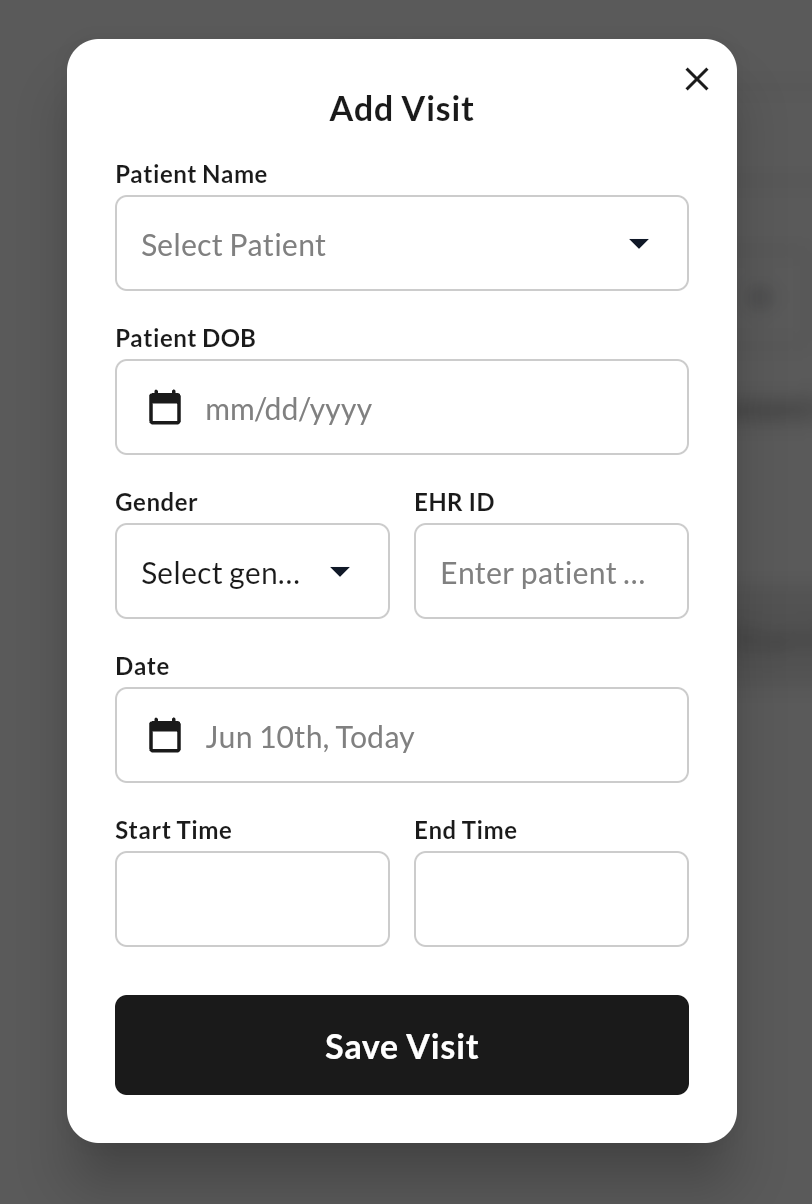 If you’re not integrated or need to document an unscheduled visit:
1. Click the **Add Visit** button.
2. Fill in the visit details:
* Patient name
* Date of birth
* Gender
* EHR ID (if applicable)
* Date, Start Time, and End Time
3. Click **Save Visit**.
4. The visit will now appear in your list, where you can begin scribing as usual.
> Manually added visits are only visible within Commure Ambient and do not sync to external EMRs unless custom integration is configured.
***
### Navigation Tips
* Use **Search** or **Filter** to find visits by patient name or time.
* Use the **My Visits** toggle to limit the view to your assigned patients.
* Generated visits are marked with a ✅.
***
For more information on details how to this up, please contact sales or your customer support manager.
If you’re not integrated or need to document an unscheduled visit:
1. Click the **Add Visit** button.
2. Fill in the visit details:
* Patient name
* Date of birth
* Gender
* EHR ID (if applicable)
* Date, Start Time, and End Time
3. Click **Save Visit**.
4. The visit will now appear in your list, where you can begin scribing as usual.
> Manually added visits are only visible within Commure Ambient and do not sync to external EMRs unless custom integration is configured.
***
### Navigation Tips
* Use **Search** or **Filter** to find visits by patient name or time.
* Use the **My Visits** toggle to limit the view to your assigned patients.
* Generated visits are marked with a ✅.
***
For more information on details how to this up, please contact sales or your customer support manager.