> ## Documentation Index
> Fetch the complete documentation index at: https://docs.ambient.commure.com/llms.txt
> Use this file to discover all available pages before exploring further.
# Preferences
> Tailor your scribe settings for workflows and compliance.
## Preferences
**Preferences** section (Site Level) allows you to customize how Commure Ambient behaves across visits, notes, data handling, and security. Tailor your scribe experience to match your workflow and compliance needs.
 ***
### Display Settings
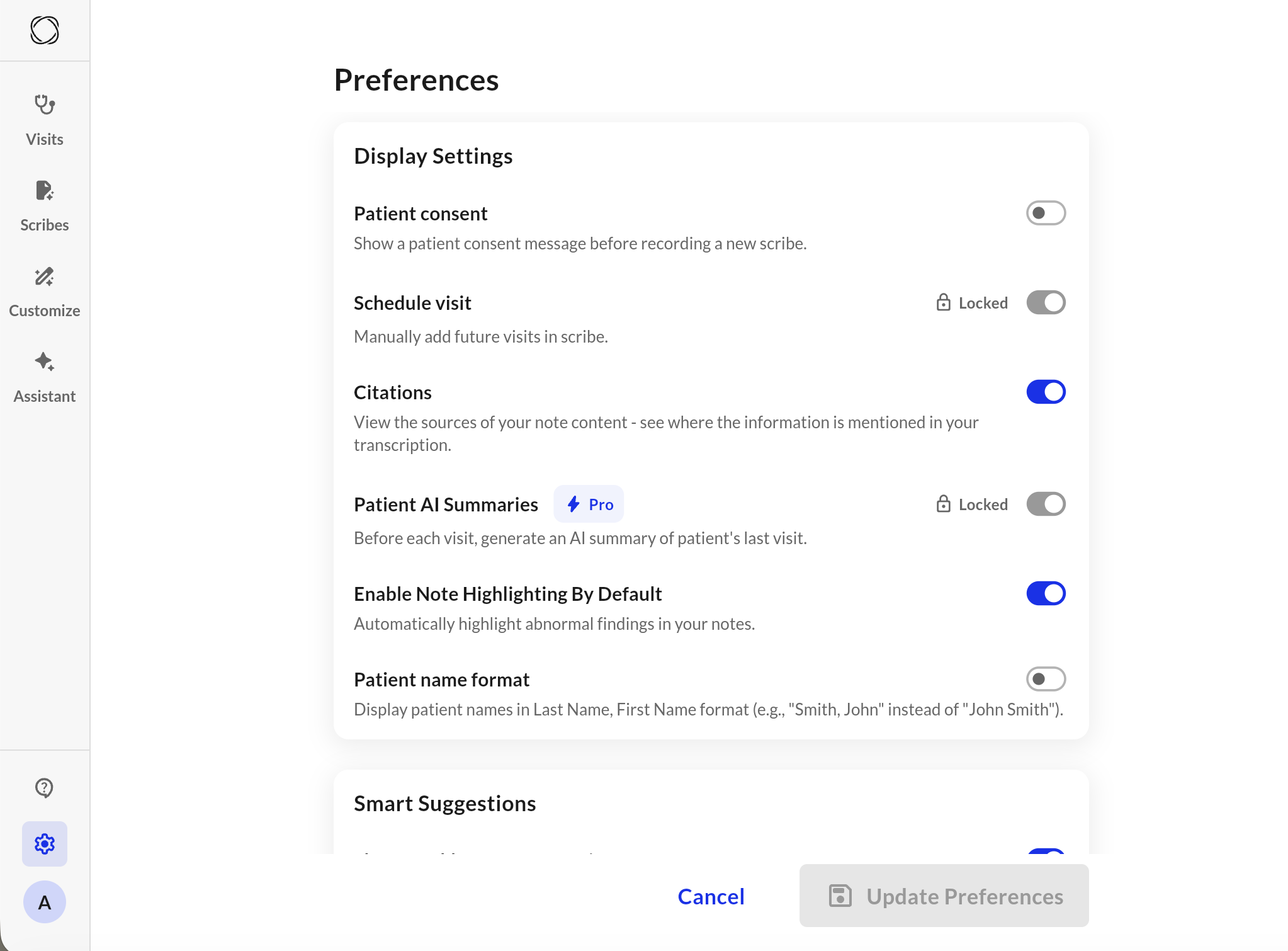
* **Show patient consent pop-up:** Toggle whether a consent reminder appears before each scribe starts.
* **Schedule Visit:** Enable the ability to manually add visits within the app (useful for non-integrated sites).
* **Citation:** View where information in your note was sourced from the transcript, adding transparency and auditability.
* **Patient AI Summaries** (Pro feature): Automatically generate an AI summary of the patient’s last visit before each new one begins.
***
### Note Preferences (All Notes)
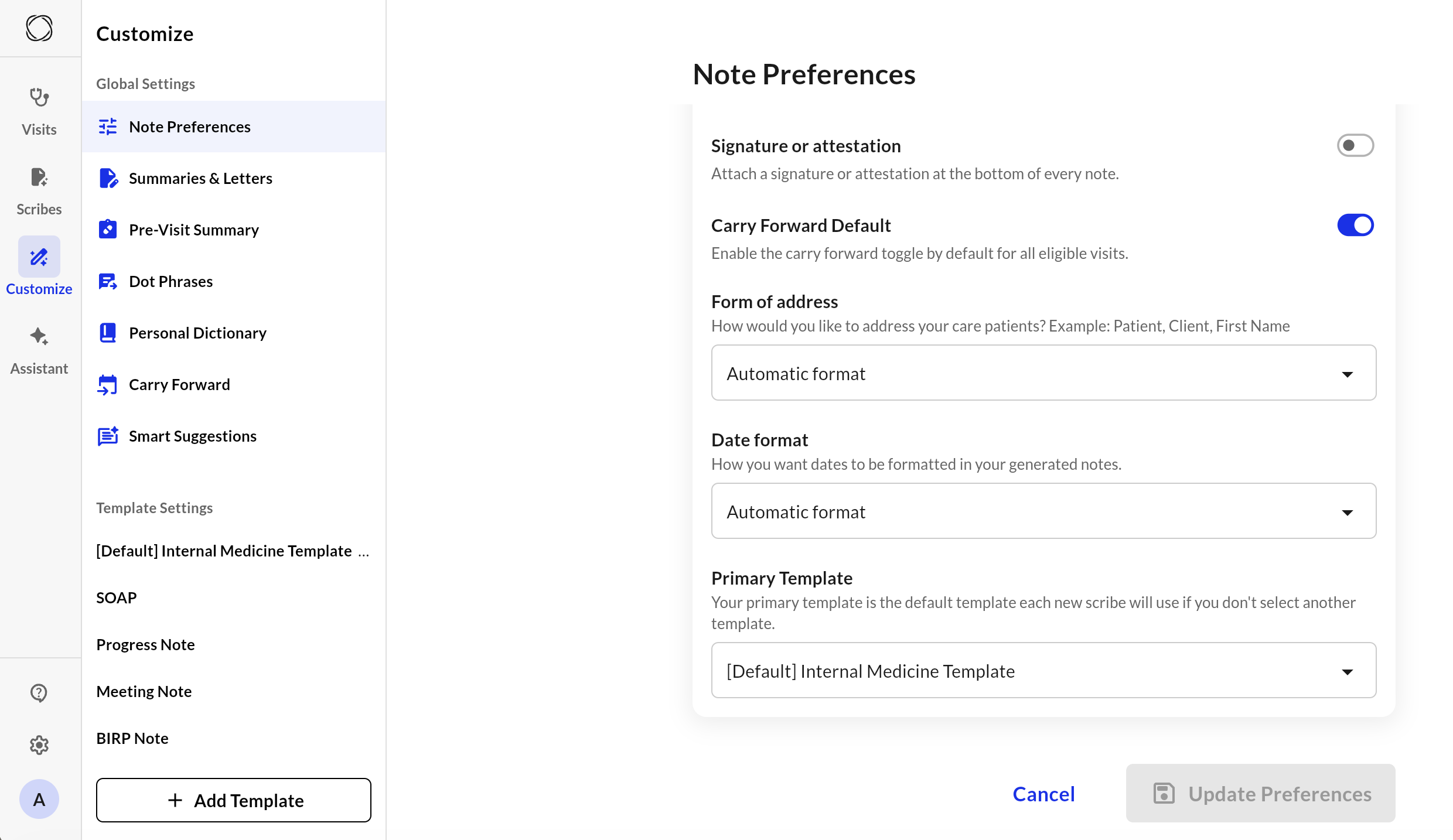
* **Signature or Attestation:** Add a default closing statement or signature block to all notes. This can include phrases like “Documented by \[Your Name], MD” or legal attestation language.
* **Carry Forward Default:** Enable carry forward of previous notes for all all elligble visits by default.
* **Form of Address:** Customize how the patient is referred to in generated notes (e.g., “the patient,” “Mr. Smith”).
* **Date Format:** How you wish dates to appear within your notes.
* **Primary Template:** Set a default template (e.g., SOAP Note) that new scribes will use unless manually changed.
***
### Display Settings
* **Show patient consent pop-up:** Toggle whether a consent reminder appears before each scribe starts.
* **Schedule Visit:** Enable the ability to manually add visits within the app (useful for non-integrated sites).
* **Citation:** View where information in your note was sourced from the transcript, adding transparency and auditability.
* **Patient AI Summaries** (Pro feature): Automatically generate an AI summary of the patient’s last visit before each new one begins.
***
### Note Preferences (All Notes)
* **Signature or Attestation:** Add a default closing statement or signature block to all notes. This can include phrases like “Documented by \[Your Name], MD” or legal attestation language.
* **Carry Forward Default:** Enable carry forward of previous notes for all all elligble visits by default.
* **Form of Address:** Customize how the patient is referred to in generated notes (e.g., “the patient,” “Mr. Smith”).
* **Date Format:** How you wish dates to appear within your notes.
* **Primary Template:** Set a default template (e.g., SOAP Note) that new scribes will use unless manually changed.
 ***
### **Recording Preferences**
* **Show "Audio is low" Alerts:** Display on-screen warnings during a recording if the microphone volume drops too low (recommended).
* **Low audio haptic feedback:** Receive gentle physical vibrations (haptics) to alert you when your microphone isn't picking up sufficient sound during a recording.
***
### Smart Suggestions
* **Show weekly smart suggestions:** Enable this to receive weekly AI-driven customization recommendations tailored to your specific editing patterns.
***
### Data Management
* **Automatically Delete Scribes:** Choose how long your notes should be stored before automatic deletion (e.g., after 30 days). Useful for managing HIPAA-compliant data retention policies.
* **Enable Recording Playback:** Allow recorded audio to be stored and replayed for transcription review. Requires patient consent to record.
***
### Security
* **Enable Two-Step Verification** Adds an extra layer of security by requiring a 6-digit code sent to your email when logging in.
* **Enable Face ID** Use Face ID (on compatible devices) to log in without entering your password.
***
These settings apply globally to your account. Be sure to save any changes and verify that they align with your clinic’s compliance guidelines.
***
### **Recording Preferences**
* **Show "Audio is low" Alerts:** Display on-screen warnings during a recording if the microphone volume drops too low (recommended).
* **Low audio haptic feedback:** Receive gentle physical vibrations (haptics) to alert you when your microphone isn't picking up sufficient sound during a recording.
***
### Smart Suggestions
* **Show weekly smart suggestions:** Enable this to receive weekly AI-driven customization recommendations tailored to your specific editing patterns.
***
### Data Management
* **Automatically Delete Scribes:** Choose how long your notes should be stored before automatic deletion (e.g., after 30 days). Useful for managing HIPAA-compliant data retention policies.
* **Enable Recording Playback:** Allow recorded audio to be stored and replayed for transcription review. Requires patient consent to record.
***
### Security
* **Enable Two-Step Verification** Adds an extra layer of security by requiring a 6-digit code sent to your email when logging in.
* **Enable Face ID** Use Face ID (on compatible devices) to log in without entering your password.
***
These settings apply globally to your account. Be sure to save any changes and verify that they align with your clinic’s compliance guidelines.