> ## Documentation Index
> Fetch the complete documentation index at: https://docs.ambient.commure.com/llms.txt
> Use this file to discover all available pages before exploring further.
# Dot Phrases
> Speak or type shortcuts that instantly expand into full notes.
## Dot Phrases
The **Dot Phrases** feature allows you to configure shortcut audio triggers that automatically expand into longer phrases during documentation. This helps streamline note creation and reduce repetitive typing.
***
### What is a Dot Phrase?
A dot phrase pairs a **short audio cue** with a **predefined expanded phrase**. When the audio trigger is detected during documentation, the expanded text will be inserted automatically into the note.
For example:
* **Audio Trigger:** `belly`
* **Expanded Phrase:** `abdomen`
***
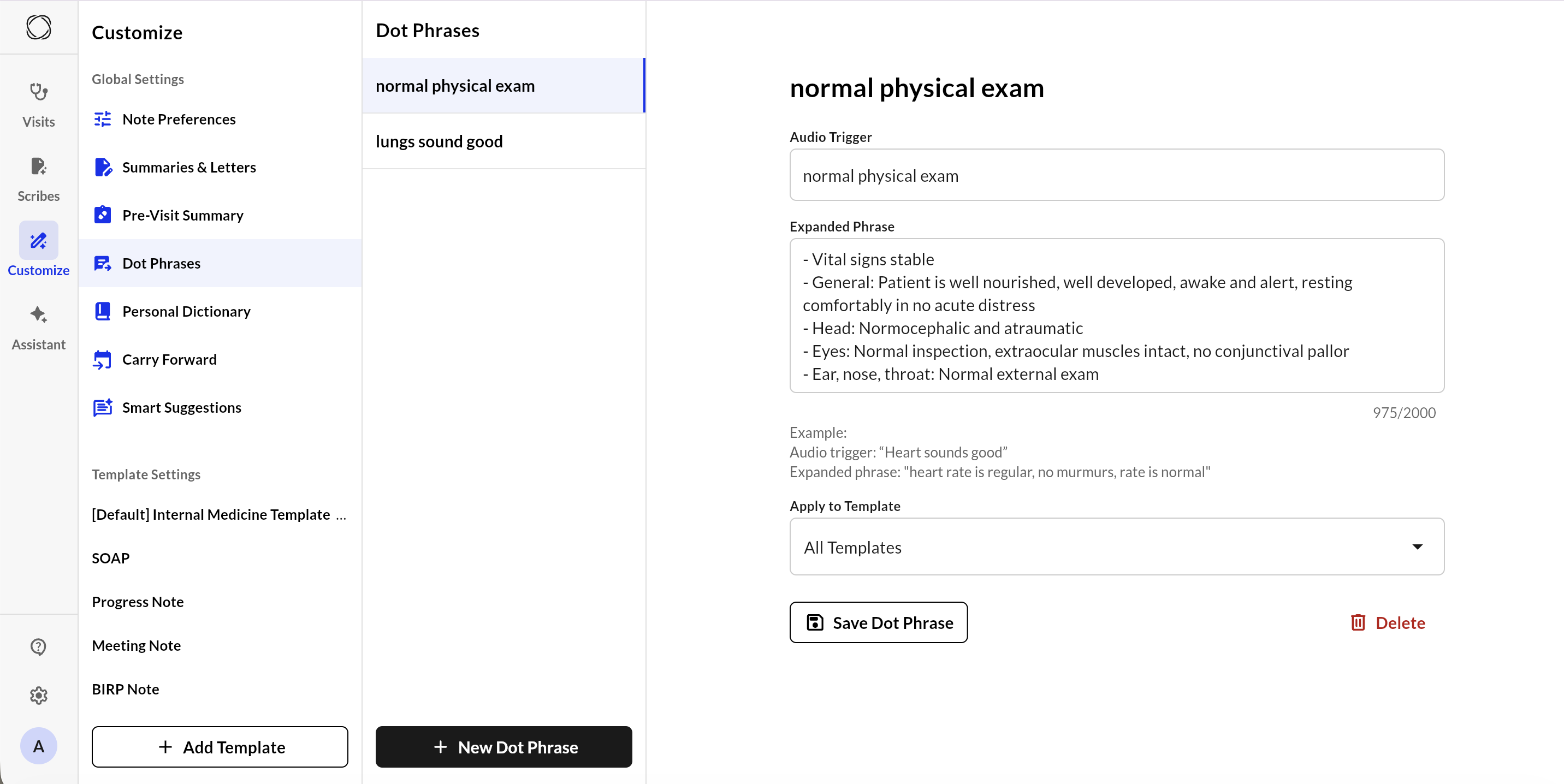
### Creating or Editing a Dot Phrase
To create a new dot phrase or edit an existing one:
1. **Audio Trigger**:
* Enter the voice command you want to use (e.g., `belly`, `heart sounds good`).
* This should be short, unique, and easy to say clearly.
2. **Expanded Phrase**:
* Input the full text you want inserted when the trigger is recognized (up to 2000 characters).
* You can include clinical shorthand, normal findings, or repetitive language blocks.
3. **Apply to Template**:
* Select the template this dot phrase should be active in (e.g., SOAP Note).
* Dot phrases are template-specific to prevent accidental cross-template usage.
4. Click **Save Dot Phrase** to confirm your changes.
***
### Deleting a Dot Phrase
To delete an existing dot phrase, simply click the **Delete** button in the bottom-right corner of the phrase editor.
Deleting a dot phrase is permanent. You’ll need to re-create it from scratch if needed later.
***
### Best Practices
* Use clear, specific audio triggers to reduce misinterpretation.
* Avoid using single syllable triggers like "a", "no", or "the".
* Test your dot phrases in the context of actual note generation to confirm expected behavior.
 ***
### What is a Dot Phrase?
A dot phrase pairs a **short audio cue** with a **predefined expanded phrase**. When the audio trigger is detected during documentation, the expanded text will be inserted automatically into the note.
For example:
* **Audio Trigger:** `belly`
* **Expanded Phrase:** `abdomen`
***
### Creating or Editing a Dot Phrase
To create a new dot phrase or edit an existing one:
1. **Audio Trigger**:
* Enter the voice command you want to use (e.g., `belly`, `heart sounds good`).
* This should be short, unique, and easy to say clearly.
2. **Expanded Phrase**:
* Input the full text you want inserted when the trigger is recognized (up to 2000 characters).
* You can include clinical shorthand, normal findings, or repetitive language blocks.
3. **Apply to Template**:
* Select the template this dot phrase should be active in (e.g., SOAP Note).
* Dot phrases are template-specific to prevent accidental cross-template usage.
4. Click **Save Dot Phrase** to confirm your changes.
***
### Deleting a Dot Phrase
To delete an existing dot phrase, simply click the **Delete** button in the bottom-right corner of the phrase editor.
***
### What is a Dot Phrase?
A dot phrase pairs a **short audio cue** with a **predefined expanded phrase**. When the audio trigger is detected during documentation, the expanded text will be inserted automatically into the note.
For example:
* **Audio Trigger:** `belly`
* **Expanded Phrase:** `abdomen`
***
### Creating or Editing a Dot Phrase
To create a new dot phrase or edit an existing one:
1. **Audio Trigger**:
* Enter the voice command you want to use (e.g., `belly`, `heart sounds good`).
* This should be short, unique, and easy to say clearly.
2. **Expanded Phrase**:
* Input the full text you want inserted when the trigger is recognized (up to 2000 characters).
* You can include clinical shorthand, normal findings, or repetitive language blocks.
3. **Apply to Template**:
* Select the template this dot phrase should be active in (e.g., SOAP Note).
* Dot phrases are template-specific to prevent accidental cross-template usage.
4. Click **Save Dot Phrase** to confirm your changes.
***
### Deleting a Dot Phrase
To delete an existing dot phrase, simply click the **Delete** button in the bottom-right corner of the phrase editor.