> ## Documentation Index
> Fetch the complete documentation index at: https://docs.ambient.commure.com/llms.txt
> Use this file to discover all available pages before exploring further.
# Carry Forward Notes
> Automatically pull forward relevant info from past visits into your new note.
## Carry Forward
**Carry Forward** helps providers save time by using relevant information from a patient’s previous visit note with the provider to pre-fill the new note for their current visit.
This feature is particularly useful for follow-ups or recurring visits, where much of the patient's history or previous assessments are still relevant.
***
### What Gets Carried Forward?
Each section in your note (e.g. Plan, Objective, Subjective, etc.) can behave differently depending on how the template is configured and what selections you make. Here's what may happen and what you can choose:
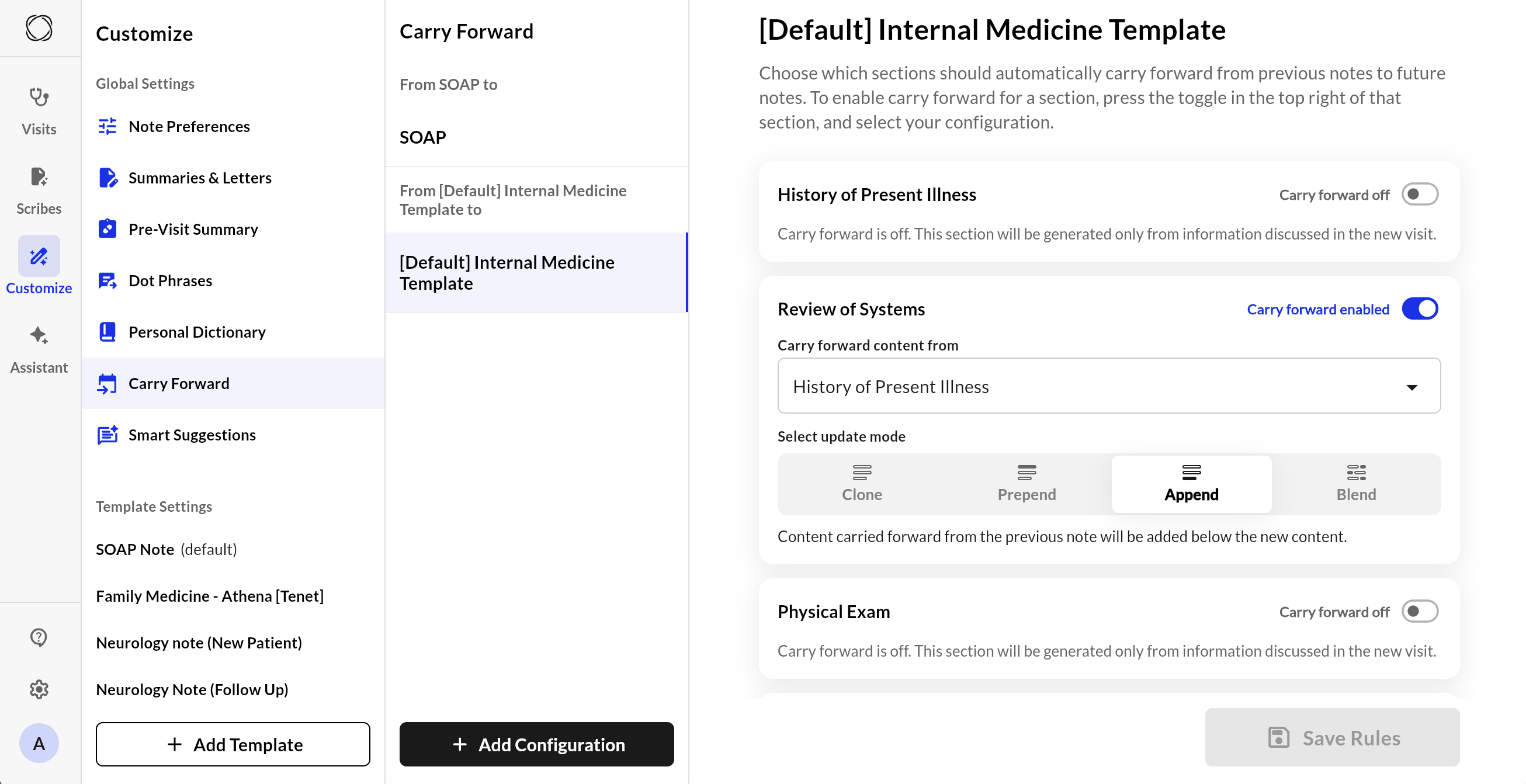
* **Clone:** Ignores new input; uses only the previous note’s content.
* **Prepend:** Previous content is copied and new content is added at the end.
* **Append:** Places the previous note’s content after the new content.
* **Blend:** Old and new content are merged together in a cohesive way.
***
### Use Carry Forward
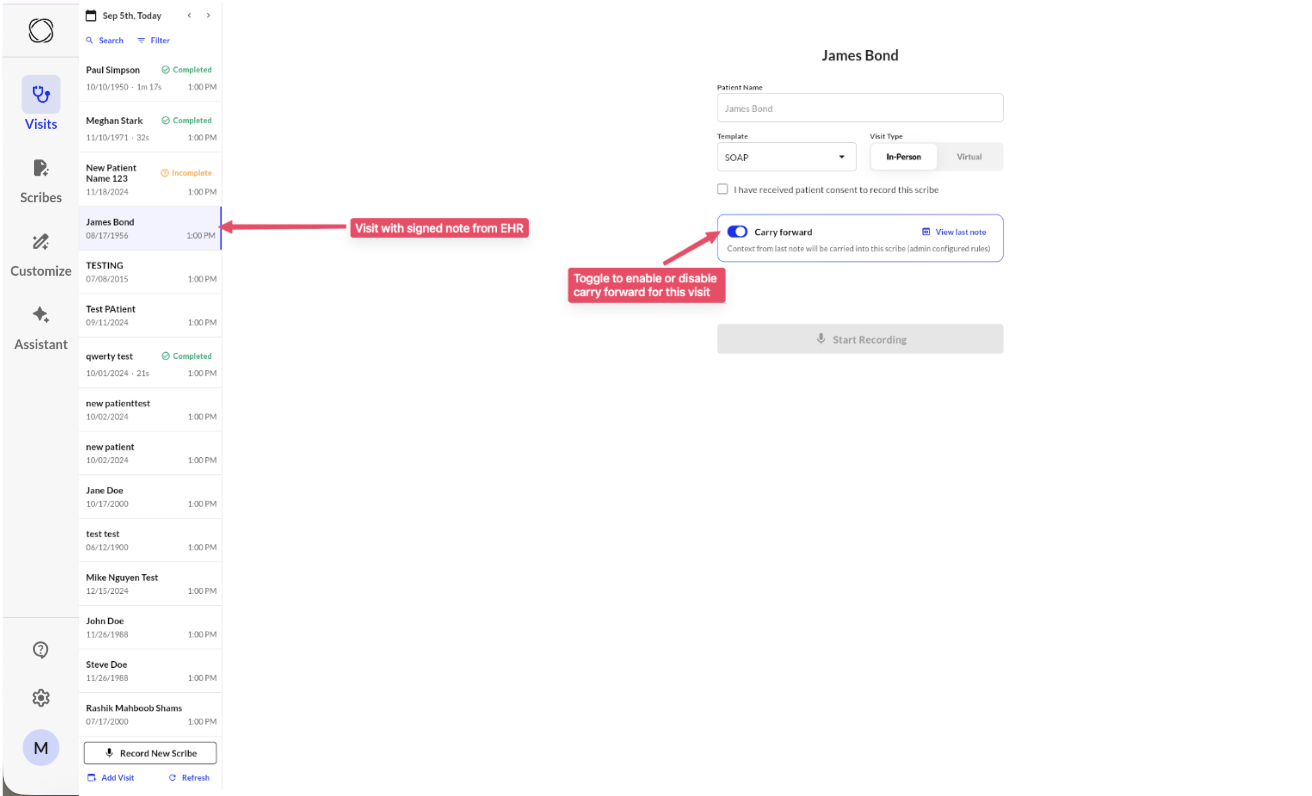
* **EHR-Integrated Sites**: Once configured, carry forward will appear for eligible notes. The new note is automatically created using content from the previous visit with the same provider. You’ll be taken directly to the editing screen with carried-forward data already populated.
* **Non-Integrated Sites**: Navigate to your next visit. When you enter the patient name, you'll be able to choose a past visit with that same patient and verify if you want to set up Carry Forward.
* **Collaborator view:** Collaborators can now access and enable Carry Forward for their provider.
* **Scribe fallback:** If a signed note isn’t available, we use the last scribe-generated note.
***
### Set Up Carry Forward:
**User Level:**
1. Go to ****Customize then Carry Forward****
2. Click on the **+ Add Configuration** button.
3. Create carry forward rule mapping between two templates.
4. By default, all rules between the templates are disabled. You need to configure the rules using the UI.
5. Toggle on and off per at the section-level to enable carry-forward across templates.
Currently, template-level carry forward is setup by Commure which is typically set as site level default for providers associated with the template.
**Compare View**
Curious to see exactly what information carried over from a past visit? The Compare View feature makes it easy to spot the differences between old and new information.
1. **Start a new Scribe** for a patient who already has a previous note in the system. Make sure you select a template that has Carry Forward enabled.
2. **Capture your visit** as usual, adding any new details for the current appointment.
3. **Generate your note.**
4. Once the note is ready, click the **Compare View** toggle. This will highlight the differences so you can easily see exactly what was carried over from the previous visit and what was newly generated.
***
### Smart Logic
Carry Forward uses an advanced language model (LLM) to intelligently decide what to include, how to merge past content, and when to regenerate a section completely. Behind the scenes, the system:
* Uses **guideline prompts** to guide behavior section by section
* Applies **system and user roles** in the AI call to ensure accurate, role-specific output
* Executes logic modularly to optimize performance and ensure consistent structure
***
### Benefits
* Saves time on repetitive documentation
* Ensures continuity between visits
* Reduces errors by keeping relevant context
* Works with both manual and EHR-integrated workflows
***
### Commure Carry Forward (Non Integrated Flow)
### Commure Carry Forward (Integrated Flow)
Users no longer need to navigate to **My Scribes → AI Actions → Carry Forward**. The previous signed note from the EHR is automatically pulled into our system, allowing the user to start a visit with carry forward already in place.
For more information on details how to this up, please contact sales or your customer support manager.