> ## Documentation Index
> Fetch the complete documentation index at: https://docs.ambient.commure.com/llms.txt
> Use this file to discover all available pages before exploring further.
# Pre Visit Summaries
> Automatically summarize past visits so you’re ready for the next one.
## AI Summaries
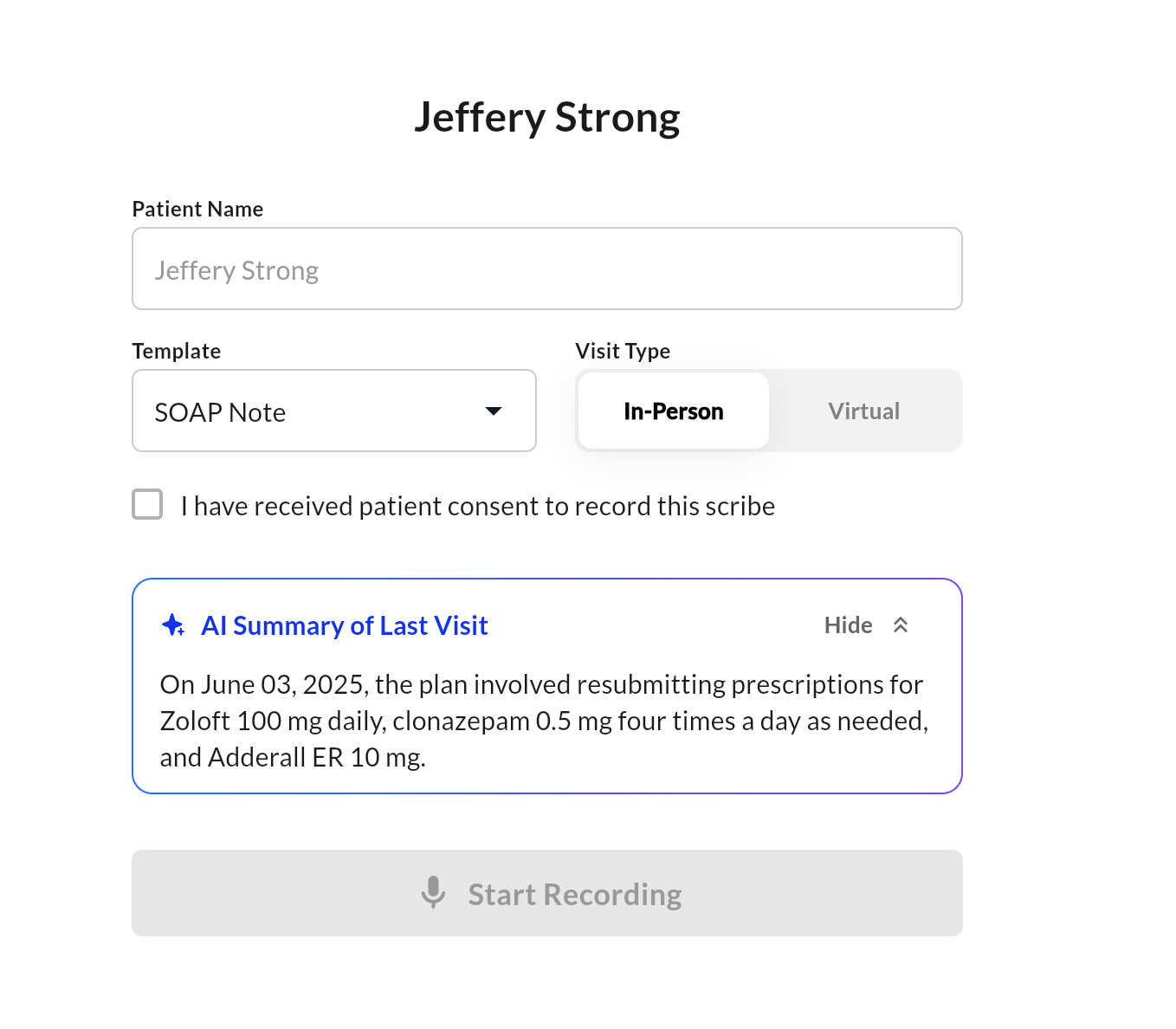
**AI Summaries** help you prepare for upcoming appointments by providing a concise summary of the patient's most recent visit. These summaries are generated automatically using AI and are available directly in the scribe creation flow for integrated users.
 ***
### What It Does
* Automatically pulls the patient’s **last visit note**
* Summarizes key findings, symptoms, and treatment plans
* Displays the summary before starting a new scribe session
* Helps you **quickly get context** without reading full prior notes
> Example:
> *"On June 02, 2025, the patient experienced decreased pain in the first step and demonstrated improvement in left foot intrinsic strength..."*
***
### When and Where It Appears
* **Displayed during the scribe setup screen** for EMR-synced visits
* Visible beneath the patient name, template, and visit type selector
* Toggle between **Show/Hide** if you want to reference or minimize the summary
***
### Integration Required
AI Summaries are only available to sites with **EMR integration enabled**. The summary is based on structured or transcribed content from the patient's last documented visit.
***
### Benefits
* Quickly reorient before a follow-up visit
* Reduce time spent rereading long notes
* Improve continuity of care and patient personalization
For more information on details how to set this up, please contact sales or your customer support manager.
***
### What It Does
* Automatically pulls the patient’s **last visit note**
* Summarizes key findings, symptoms, and treatment plans
* Displays the summary before starting a new scribe session
* Helps you **quickly get context** without reading full prior notes
> Example:
> *"On June 02, 2025, the patient experienced decreased pain in the first step and demonstrated improvement in left foot intrinsic strength..."*
***
### When and Where It Appears
* **Displayed during the scribe setup screen** for EMR-synced visits
* Visible beneath the patient name, template, and visit type selector
* Toggle between **Show/Hide** if you want to reference or minimize the summary
***
### Integration Required
AI Summaries are only available to sites with **EMR integration enabled**. The summary is based on structured or transcribed content from the patient's last documented visit.
***
### Benefits
* Quickly reorient before a follow-up visit
* Reduce time spent rereading long notes
* Improve continuity of care and patient personalization
For more information on details how to set this up, please contact sales or your customer support manager.