> ## Documentation Index
> Fetch the complete documentation index at: https://docs.ambient.commure.com/llms.txt
> Use this file to discover all available pages before exploring further.
# After Visit Summaries
> Generate a summary of your encounter and directly email it to your patient in a single click.
## After Visit Summary
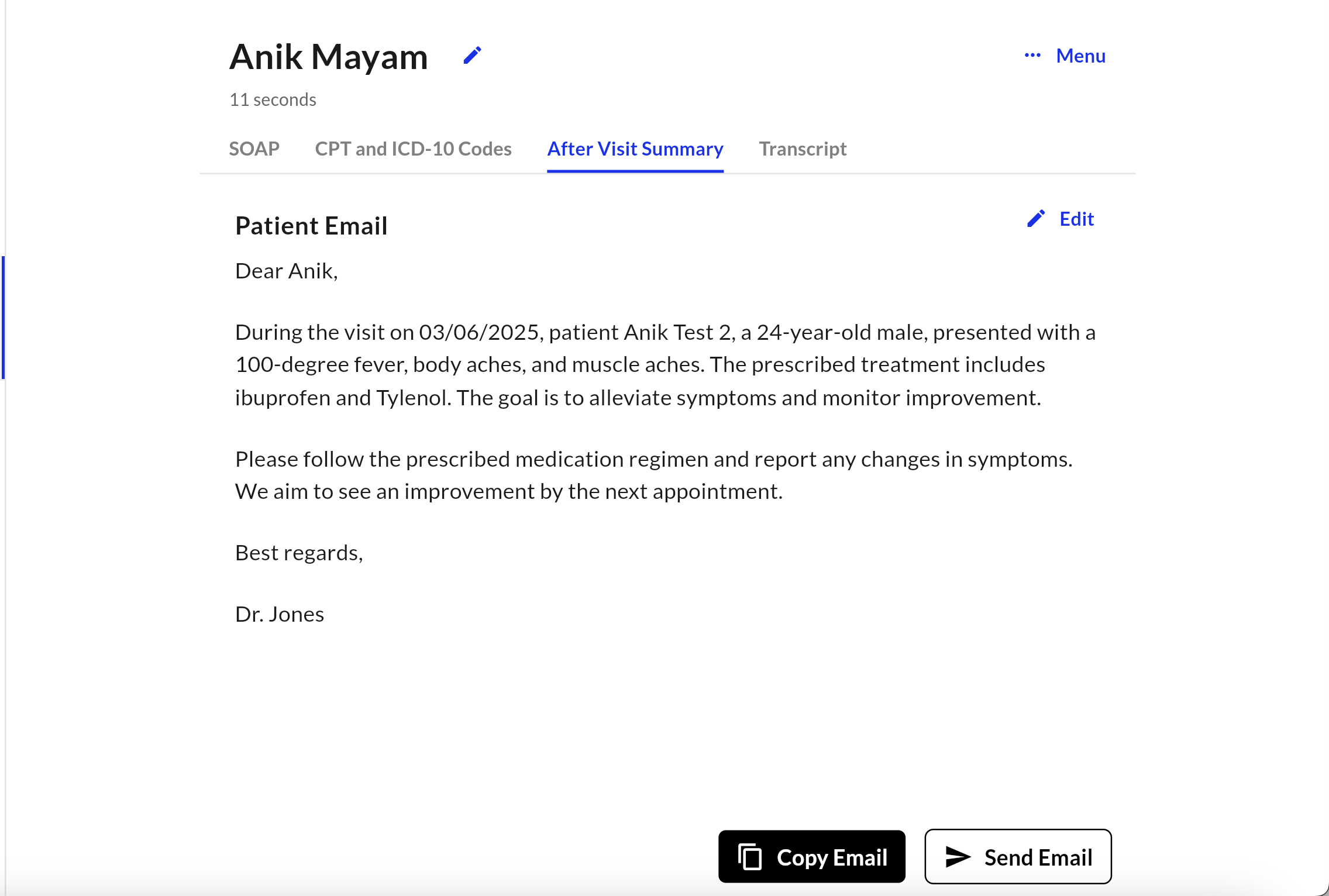
**After Visit Summaries** help you generate a concise, clear, and customizable digest of your patient's visit. It delivers a polished, patient-friendly post-visit communication experience.
### What It Does
* Manually generates an AVS tied to a specific note template
* Edit the content of the summary before sending
* Securely email the summary to the patient with one click
* Automatically generate AVS for each visit by linking templates and enabling a flag
### When and Where It Appears
* Click **AI Actions** on your generated scribe and you will see the option for **After Visit Summary**
* A screen will display allowing you to view, edit, and copy the AVS
* Click **Send Email** opening a popup for you to view, edit, and email the summary directly to your patient
### Customize your AVS
Your After Visit Summary can be customized with your own specific rules and guidelines to follow. Navigate to **Customize**, click on **After Visit Summary** and adjust your formatting!
### Benefits
* Quickly summarize the visit with medically relevant context for your patient -- with goals, instructions, and next steps.
* Reduce time, energy, and our favorite... clicks spent to draft these manually.
For more information on details how to set this up, questions regarding enabling custom AVS templates per scribe template, or anything else, please contact sales or your customer support manager.
 ### What It Does
* Manually generates an AVS tied to a specific note template
* Edit the content of the summary before sending
* Securely email the summary to the patient with one click
* Automatically generate AVS for each visit by linking templates and enabling a flag
### When and Where It Appears
* Click **AI Actions** on your generated scribe and you will see the option for **After Visit Summary**
* A screen will display allowing you to view, edit, and copy the AVS
* Click **Send Email** opening a popup for you to view, edit, and email the summary directly to your patient
### Customize your AVS
Your After Visit Summary can be customized with your own specific rules and guidelines to follow. Navigate to **Customize**, click on **After Visit Summary** and adjust your formatting!
### Benefits
* Quickly summarize the visit with medically relevant context for your patient -- with goals, instructions, and next steps.
* Reduce time, energy, and our favorite... clicks spent to draft these manually.
### What It Does
* Manually generates an AVS tied to a specific note template
* Edit the content of the summary before sending
* Securely email the summary to the patient with one click
* Automatically generate AVS for each visit by linking templates and enabling a flag
### When and Where It Appears
* Click **AI Actions** on your generated scribe and you will see the option for **After Visit Summary**
* A screen will display allowing you to view, edit, and copy the AVS
* Click **Send Email** opening a popup for you to view, edit, and email the summary directly to your patient
### Customize your AVS
Your After Visit Summary can be customized with your own specific rules and guidelines to follow. Navigate to **Customize**, click on **After Visit Summary** and adjust your formatting!
### Benefits
* Quickly summarize the visit with medically relevant context for your patient -- with goals, instructions, and next steps.
* Reduce time, energy, and our favorite... clicks spent to draft these manually.