> ## Documentation Index
> Fetch the complete documentation index at: https://docs.ambient.commure.com/llms.txt
> Use this file to discover all available pages before exploring further.
# Collaborator
> Enable assistants and scribes to support multiple providers from a shared workspace.
## Collaborator View
**Collaborator View** enables human scribes and assistants to work seamlessly with multiple providers from a single account. It supports flexible delegation while maintaining provider-level control over templates, formatting, and appointment data.
 ***
### What is Collaborator Mode?
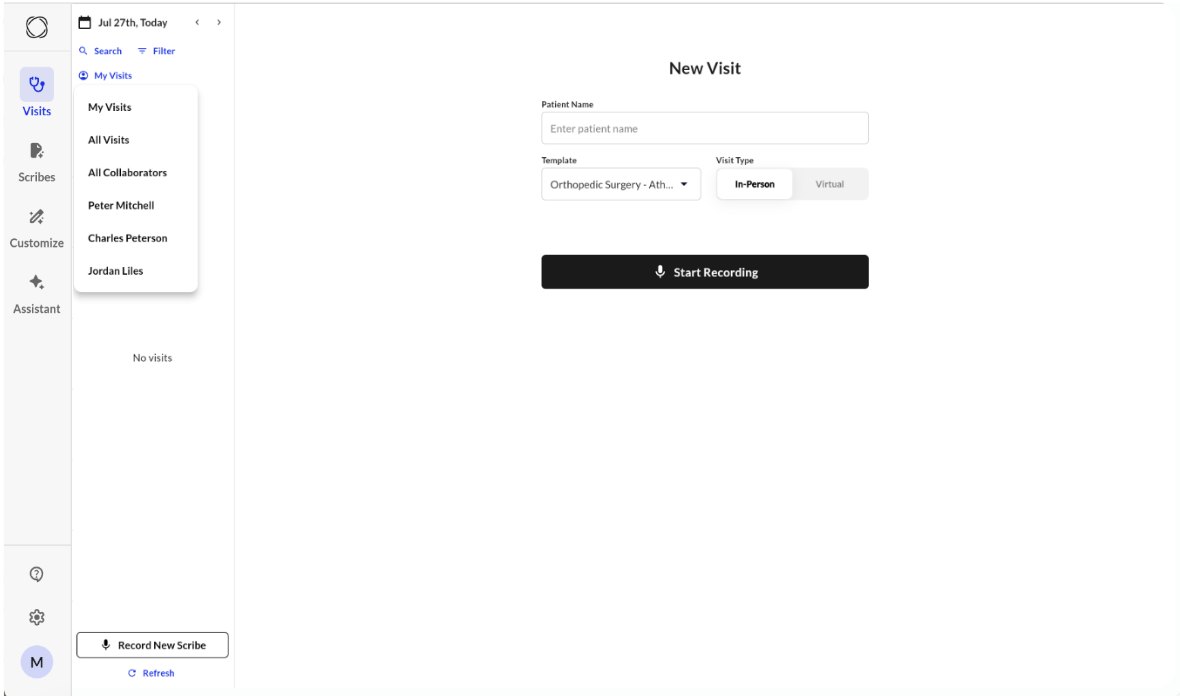
When a user selects **“All Collaborators”** or a specific provider name from the Visits dropdown, they enter **Collaborator Mode**. This view shows all appointments for providers the user is linked to, allowing them to record notes on behalf of those providers.
***
### How Permissions Work
* **Collaborators only see templates that the provider has access to.** This keeps the UI clean and provider-specific.
* Collaborators can **record** using any template the provider has access to — even if the collaborator doesn't have that template themselves. However, they **won't be able to view the generated note** afterward if the template is restricted to the provider.
* **Custom formatting and dot phrases come from the provider’s account** if the collaborator starts recording from an appointment.
* If the scribe is recorded **without linking to an appointment**, the collaborator’s own preferences are used instead.
***
### My Scribes in Collaborator Mode
* Collaborators can see all scribes they recorded.
* Each scribe shows the **associated provider** (if it was tied to a provider's appointment).
* Collaborators can **edit, regenerate, and EHR sync** notes as usual.
***
### Provider Visibility
* Providers can also see notes recorded by collaborators for their appointments.
* Providers can:
* **View, edit, regenerate, and sync** the note.
* See the **sync status** of the scribe (e.g., if a collaborator synced it).
* See the appointment marked as **Generated**.
***
### Archiving Behavior
* Deleting a scribe from the frontend **archives it from both collaborator and provider views**.
* Archiving does not delete the scribe permanently but removes it from default views.
***
### Collaboration Flexibility
* A single provider can have **multiple collaborators**.
* A single collaborator can be linked to **multiple providers**.
* This supports shared documentation workflows in busy clinics or hospitalist environments.
***
For more information on details how to this up, please contact sales or your customer support manager.
***
### What is Collaborator Mode?
When a user selects **“All Collaborators”** or a specific provider name from the Visits dropdown, they enter **Collaborator Mode**. This view shows all appointments for providers the user is linked to, allowing them to record notes on behalf of those providers.
***
### How Permissions Work
* **Collaborators only see templates that the provider has access to.** This keeps the UI clean and provider-specific.
* Collaborators can **record** using any template the provider has access to — even if the collaborator doesn't have that template themselves. However, they **won't be able to view the generated note** afterward if the template is restricted to the provider.
* **Custom formatting and dot phrases come from the provider’s account** if the collaborator starts recording from an appointment.
* If the scribe is recorded **without linking to an appointment**, the collaborator’s own preferences are used instead.
***
### My Scribes in Collaborator Mode
* Collaborators can see all scribes they recorded.
* Each scribe shows the **associated provider** (if it was tied to a provider's appointment).
* Collaborators can **edit, regenerate, and EHR sync** notes as usual.
***
### Provider Visibility
* Providers can also see notes recorded by collaborators for their appointments.
* Providers can:
* **View, edit, regenerate, and sync** the note.
* See the **sync status** of the scribe (e.g., if a collaborator synced it).
* See the appointment marked as **Generated**.
***
### Archiving Behavior
* Deleting a scribe from the frontend **archives it from both collaborator and provider views**.
* Archiving does not delete the scribe permanently but removes it from default views.
***
### Collaboration Flexibility
* A single provider can have **multiple collaborators**.
* A single collaborator can be linked to **multiple providers**.
* This supports shared documentation workflows in busy clinics or hospitalist environments.
***
For more information on details how to this up, please contact sales or your customer support manager.